AmiAuth
🎉 AmiAuth 1.0 is released! Grab it from Aminet or the GitHub release, then head to Installation to get going.
A native two-factor authentication (2FA) code generator for classic AmigaOS.
AmiAuth implements TOTP (RFC 6238) and HOTP (RFC 4226) — the six-digit codes used by GitHub, Google, Microsoft, banks and countless other sites — so your Amiga can stand in for a phone authenticator app. It stores multiple accounts in an (optionally passphrase-encrypted) vault, generates 6- or 8-digit codes with a live countdown, and — critically for the platform — solves the accurate-time problem that TOTP depends on.
It runs on anything from a stock 68000 A500 up to an accelerated or emulated machine. The CLI needs only AmigaOS 2.04; the GUI needs OS 3.0+ and ReAction/ClassAct.
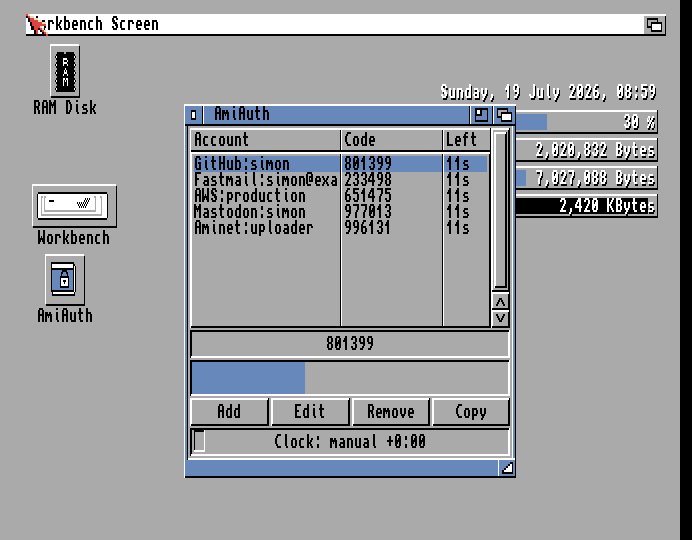
Where to start
- New user? Read Installation and then the Getting Started walkthrough.
- Using the Shell? The full command reference is in CLI Reference.
- Using the GUI? See the GUI Guide, and Commodity and Tooltypes for running it in the background with a hotkey.
Documentation
| Page | What it covers |
|---|---|
| Installation | Requirements, copying to a drawer, WBStartup setup |
| Getting Started | First run: create a vault, add an account, get a code |
| Managing Accounts | Adding, editing and removing accounts; otpauth:// and QR import |
| CLI Reference | Every Shell command, its arguments and examples |
| GUI Guide | The window, menus, clipboard copy, unlock and auto-lock |
| Commodity and Tooltypes | Hotkey, Exchange, WBStartup, all icon tooltypes |
| Vault and Passphrases | Encryption, always-unlocked mode, re-keying, backups |
| Time and Clock Sync | SNTP, UTC offsets, and the red/amber/green indicator |
| Settings Reference | Every ENVARC:AmiAuth/ setting |
| Security Model | What the vault does and does not protect — read this |
| Troubleshooting and FAQ | Common problems and questions |
| Building from Source | Host and m68k builds, tests |
Developer-facing design documents (architecture, the frozen vault file format,
the clock design) live in the repository under
docs/.
AI-assisted development
Be aware: AmiAuth was written largely by an AI coding agent (Anthropic's Claude, via Claude Code), working under human direction, review and on-hardware testing. Because this is a security tool, that disclosure matters — please weigh your trust accordingly rather than taking it on faith. The cryptographic primitives are checked against their published RFC test vectors and differentially fuzzed against OpenSSL in CI, and the entire source is BSD-licensed and open for review. Read the Security Model and judge it for yourself.
License
BSD 2-Clause. Copyright © 2026 Simon Dick. Bundled third-party source (the
ISC-licensed quirc QR decoder) is listed in
THIRDPARTY.md.